Use case: PDF to link

PDF to link: send your PDF as a link and see who reads it

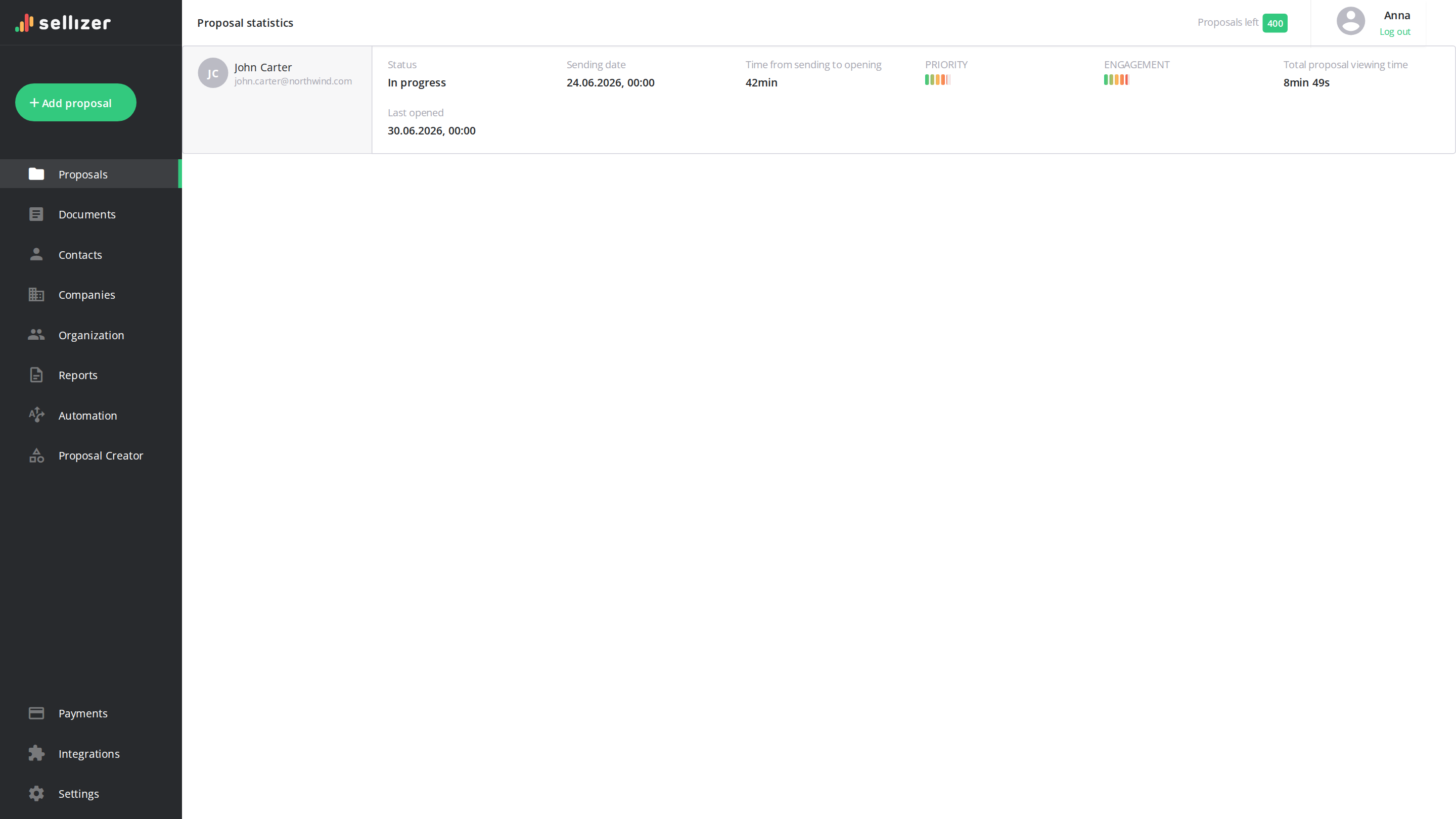
Upload the PDF, copy the link and send it wherever you talk to the client. Sellizer texts you on the first open and shows the reading time of every page. You decide whether the file can be downloaded or printed, and you can switch the link off at any time.

  • Upload the PDF
  • Copy the link
  • See who opens it
Northwind Studio opened your PDF · page 4 of 12
Northwind Studio is reading the pricing page · 3 min
Northwind Studio opened the PDF for the second time

This site is protected by reCAPTCHA and the Google Privacy Policy and Terms of Service apply.

Why an attachment or a drive link falls short with clients

Attaching the PDF works, and so does a link from Google Drive or Dropbox. Both leave you guessing once the file has left your inbox.

You do not know whether the client has opened the file

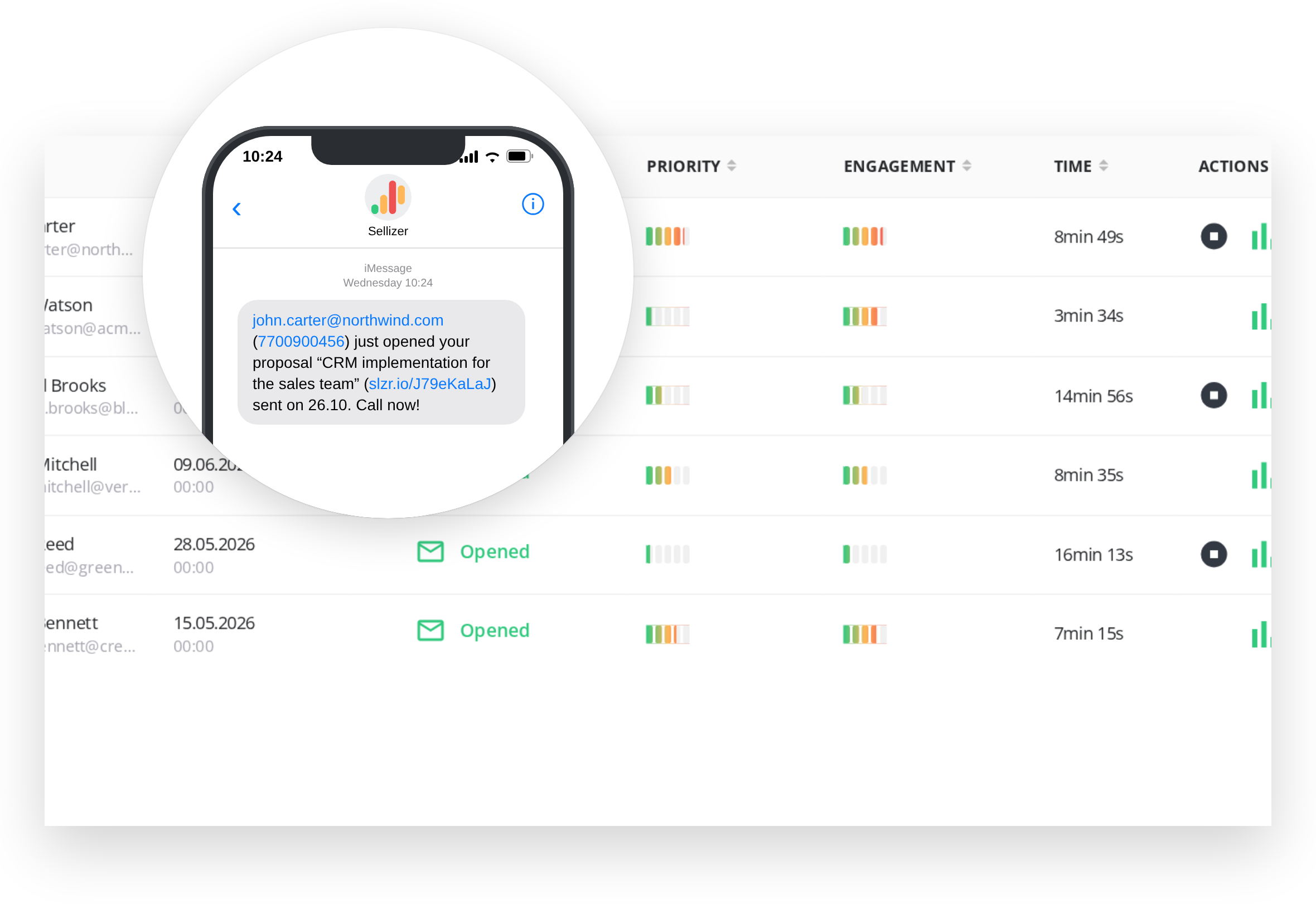
Sellizer sends you a text message on the first open and an email on every open after that.

An attachment cannot be taken back or replaced

Set an expiry date or withdraw the proposal. The client sees a message and can ask you for a new version.

The PDF gets saved and passed around without you knowing

Downloading is off unless you allow it, so the client reads the file in the browser and every view is counted.

  • One link for email, SMS, LinkedIn or WhatsApp

    Choose to send the proposal yourself and Sellizer generates a link to paste wherever you talk to the client. If you prefer email, Sellizer can send the message for you instead.

    • A link to paste anywhere
    • Up to 10 PDF files in one proposal
    • Also Word, Excel, PowerPoint, images, video and HTML
    Learn more
  • See which pages the client actually read

    For every open you see the time spent on each page, how often the client came back and which pages they skipped. A heatmap and session replay show where their attention stopped.

    • Time on every page
    • Every open and return visit
    • Heatmap and session replay
    Learn more
    See which pages the client actually read
  • A text message on the first open

    Add your phone number when you create the link. You get an SMS when the client opens the PDF for the first time and an email on every open after that, so you can call while it is still on their screen.

    • SMS on the first open
    • Email on every open
    • A link to the statistics in every alert
    Learn more
    A text message on the first open
  • A link with your company name in it

    The link can use your own subdomain of sellizer.io, which you set for free, or a subdomain of your company domain. The client sees your logo in the viewer.

    • Free custom subdomain
    • Or a subdomain of your own domain
    • Your logo in the viewer
    Learn more

How to turn a PDF into a link in Sellizer

Step 01

Upload the PDF

Click Add proposal and upload one or more files. Give the proposal a title and add the recipient.

Step 02

Choose to send it yourself

Pick the link option instead of the automatic email and enter the phone number for the SMS alert.

Step 03

Copy and send the link

Check the summary, copy the link and paste it into an email, a text message or a LinkedIn chat.

Stay in control after you send the link

Download

Reading in the browser

Downloading is off unless you allow it, and printing has its own switch. A downloaded copy has no reading statistics, so leave it off when you want to see every view.

Expiry

An expiry date

After the date the link no longer shows the PDF. The client sees that the proposal has expired and can ask you for a new one in one click. A reminder can go out 24 hours before.

Access

Switch the link off

Mark the proposal as withdrawn and the client sees that it was withdrawn, or as deleted and the link shows nothing. You can make it active again at any time.

When a free PDF link is enough

If you only need to share a file with colleagues, a link from Google Drive, Dropbox or OneDrive does the job and costs nothing. Sellizer is worth it when the PDF goes to a client and what happens after sending matters: whether they opened it, what they read and when to call. Sellizer has no free plan. You can try it for 14 days without a credit card.

To compare ways of checking whether someone opened a PDF, from read receipts to tracking tools, see PDF tracking. To act on what you see, set up automatic proposal follow-ups. How tracking works for whole proposals is explained in proposal tracking software, and plans and limits are on the pricing page.

Who sends PDFs as links

  • Salespeople who talk to clients on LinkedIn, WhatsApp or by text rather than by email
  • Agencies and studios sending proposals and portfolios that are too heavy for an attachment
  • Sales teams sharing price lists and catalogues that change and should not circulate in old versions
  • Consultants and freelancers who want to know the proposal was read before they call

In the words of our customers

quotation mark

Sellizer made it possible for us to increase the pace of customer acquisition by 300% last year thanks to additional knowledge of how customers perceive our proposals. I strongly recommend it to anyone who wants to be more efficient in such a fast-changing business and new technologies environment!

Maciej Zagórowski

CEO Fabryka e-biznesu

stripes
quotation mark

Thanks to Sellizer, I know which parts of my proposals are the most interesting for my customers - it gives me great basis to start a valuable conversation. I can also contact with clients in the best time - when they have my proposal right in front of them. Such combination made it so much easier for me to sell projects.

Damian Rams

Digital Analytics Consultant, DamianRams.pl

stripes
quotation mark

We like clever solutions. Just like in Sellizer, we believe that the time of contact with the customer really makes a big difference, so we decided to integrate our tools. Thus, Sellizer user gets a SMS message about the opening of the proposal and statistics and recipients of their proposals can ask for contact via Callpage widget. Awesome!

Sergey Butko

CMO & Co-Founder Callpage

stripes
quotation mark

Using Sellizer has improved our communication, both within and outside the company. In our internal communication, we use Sellizer to send important documents to ensure that they have not been skipped or missed among many other messages. Moreover, thanks to the use of the tool in communication with potential partners, we can see at what stage our relationship is.

Tomasz Świeboda

Managing Partner Inovo.vc

stripes
quotation mark

LinkedIn is the most important channel for communicating with clients. Sellizer allows me to quickly and conveniently send presentations and proposals, and what’s most important, allows me to react quickly to their opening, analyse interest in them and consequently conduct valuable business conversations. I recommend.

Marcin Małaszuk

Ulam Labs

stripes
quotation mark

Sellizer helps us respond to questions from our customers at the right time. Thanks to that we give added value already at the sales stage which allows us to build a relationship with the customer from the very beginning. This is very valuable to us.

Łukasz Białonoga

CEO LIKE.agency

stripes
quotation mark

Although Sellizer can at first glance be seen as a tool only for sending proposals, I can certainly confirm that it also works for sending sales folders, contracts and other documents. Thanks to this, we have a real-time preview of what is the most valuable to the customer in each document (on which parts they spent most of the time) and what needs to be improved.

Michał Boniecki

COO JetSim & JetZone24

stripes
quotation mark

Sellizer enables a thorough analysis of the customer in terms of interest in our proposal, which helps us save time in the further parts of sales process. When receiving information on how long the customer has been reading each pages of the proposal, I can predict whether the sales process will continue or our proposal is just a market recognition for statistical purposes of the potential customer.

Bartosz Makles

CEO DiSC Polska

stripes
quotation mark

Sellizer has become an inseparable tool for us in communication on several levels. As an intermediary in the logistics industry, we come into contact with both operators and their customers. Sellizer allows us to work with both the first (reporting) and the second (sending proposals) Partners. Thanks to the systematisation and transparency of the activities in Sellizer, we have been able to significantly increase the rate of acquired customers.

stripes
quotation mark

Until now, our knowledge has been ending at the stage of sending the proposal - and thanks to Sellizer - now this is the point where the acquisition of the greatest amount of knowledge about the client begins which allows the marketing team to understand better the needs and match the proposal content to the customers and sales team to contact the customers always at the right time. Thanks to the opportunities that Sellizer gives us, we can everyday increase our chances in a game called sales.

Michał Czuba

Marketing manager

stripes
quotation mark

Very often we wondered why, despite sending a large number of proposals, many of them still remained unanswered. Thanks to Sellizer, we have structured our sales process, organized sending proposals and gained awareness of their quality. Now we can easily track which parts of our proposals are the most valuable for our customers and continuously improve them. I am pleased that with Sellizer we make better use of our time as well as the potential of our customers.

Grzegorz Jaskot

Jaskot

stripes
quotation mark

We sincerely recommend Sellizer. It helps our sales team in daily duties and prioritizing customers. But that's not all. At the department level, it gives us the opportunity to improve the entire sales process based on easily measurable criteria.

Michał Drozda

Sales support manager

stripes
quotation mark

Thanks to Sellizer we have optimized our process of preparing proposals. With data sets we create tailor-made proposals to meet customers’ needs and expectations, which improves the conversion rate. I’d recommend it to anyone!

Sebastian Żarnowski

Customer Services Specialist, Kampanie SEO

stripes

Selected Clients:

Sending a PDF as a link: questions

How do I turn a PDF into a link?

Upload the PDF to a service that hosts it and gives you a web address: Google Drive, Dropbox or OneDrive for free, or a tool such as Sellizer when you also want to see who opened it. In Sellizer you add a proposal, upload the PDF, choose to send it yourself and copy the link it generates.

Is it better to send a PDF as a link or as an attachment?

An attachment is simple, but once it is sent you cannot change it, take it back or see whether it was opened. A link keeps the file in one place: you can set an expiry date, switch it off and, with a tracking tool, see every open.

Can I see who opened my PDF link?

With Sellizer, yes. You get a text message on the first open and an email on every open after that, and the statistics show the time spent on each page and every return visit.

Can the client download or print the PDF?

Only if you allow it. Both options are in the advanced settings when you send the proposal, and you can make them the default for every proposal. A downloaded copy has no reading statistics.

Can I disable a PDF link after sending it?

Yes. Set an expiry date, or change the proposal status to withdrawn or deleted. The proposal stays in your list and you can make it active again.

What files can I send as a link?

PDF, and also DOC, DOCX, XLS, XLSX, PPT, PPTX, JPG, PNG, MP4 and HTML files. One proposal can hold several files.

Send your next PDF as a link and see who reads it

Try it free for 14 days