



How to Analyze Proposal Statistics: A Guide

It is nothing new that business is ruled by numbers. Data is currently the most valuable currency in every field, sales included. So we analyze results, prepare reports and summaries - but are we always one hundred percent sure which specific factors stand behind the results of our sales activities?
Today's post is devoted to analyzing the proposal statistics delivered by Sellizer. When analyzing your sales, do you also consider the proposals you send to clients? Their structure, quality and fit with the recipient's needs? These seemingly unremarkable matters can have a decisive impact on your sales success - and failure.
We have prepared a short guide showing, step by step, how to analyze proposal statistics with Sellizer. See how quickly and easily you can check how recipients view your proposals. Use this knowledge in practice and improve your sales process.
Analyzing statistics with Sellizer: step by step
Log in to your Sellizer account and go to the proposal list. Click the green statistics icon visible in the Actions column next to the proposal you are interested in to open the statistics panel. Its view is divided into 3 main sections: General data, Detailed data and Preview and statistics of a specific page.
Section 1 - General data
In this part of the statistics panel you can check a general summary of the recipient's activity on your proposal. The statistics refresh every 5 seconds, so you can follow them in real time and be sure you will not miss any change in your client's interest.
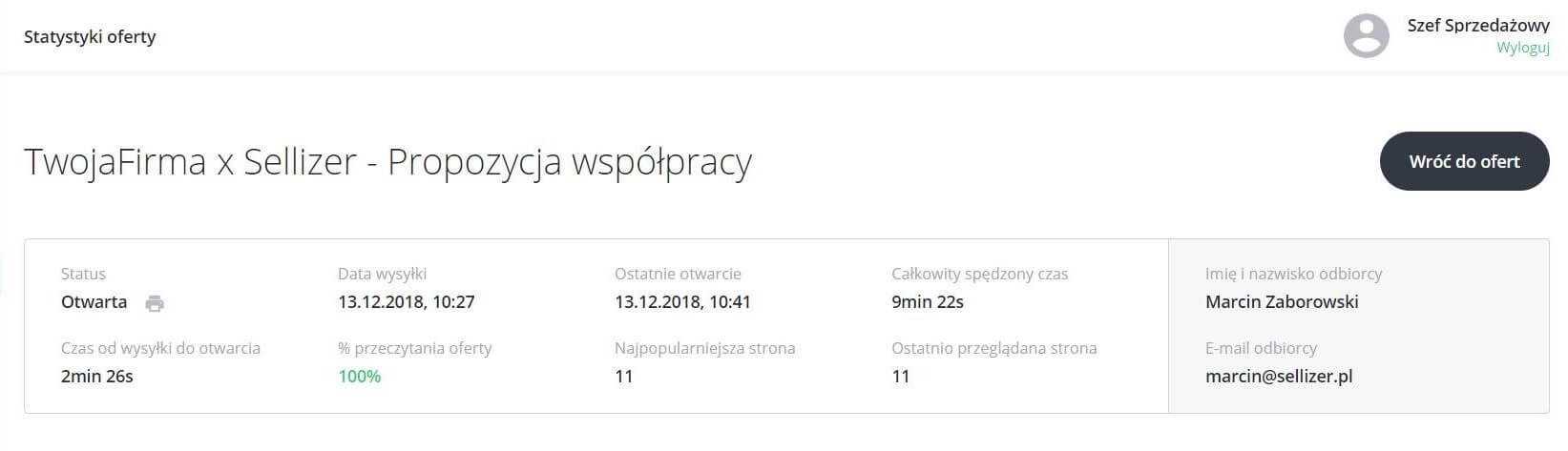
In this section you can conveniently check the following information:
whether the proposal was printed (and how many times),
when it was last opened,
how much time the recipient spent reading the proposal,
how long after sending it was opened,
what percentage of the proposal was read,
which page the recipient read most often,
which page the recipient viewed last.
Tip: use this knowledge to interest the client from the very start of the conversation. After checking the statistics, you know which pages of the proposal the client spent the most time on and which they did not view at all. This tells you how to open the conversation to genuinely engage them, instead of discouraging them with a topic they do not care about. For example, seeing in the statistics that the client skipped pages 3 and 4 describing the process, you know the topic is not important to them - so it is worth covering more generally, and certainly not at the beginning of the conversation.
Leading the conversation without the statistics cheat sheet and discussing the proposal page by page, you may end up irritating the client - by taking their time to talk about something they never wanted to hear about. Starting the conversation with what genuinely interests them, you increase the chances of building a quality relationship. All because you talk about the things valuable from the client's perspective and show respect for their time.
Section 2 - Detailed data
The section DETAILED STATISTICS (select the proposal file) gathers detailed statistics of each page of the proposal. The chart inside shows interest in each page of the proposal in real time. Just hover over the "bar" assigned to a specific page to quickly and conveniently check how much time the client spent reading that page and how often it was viewed compared to the others. Additionally, clicking a specific bar opens a preview of that page in the view below (see section 3).
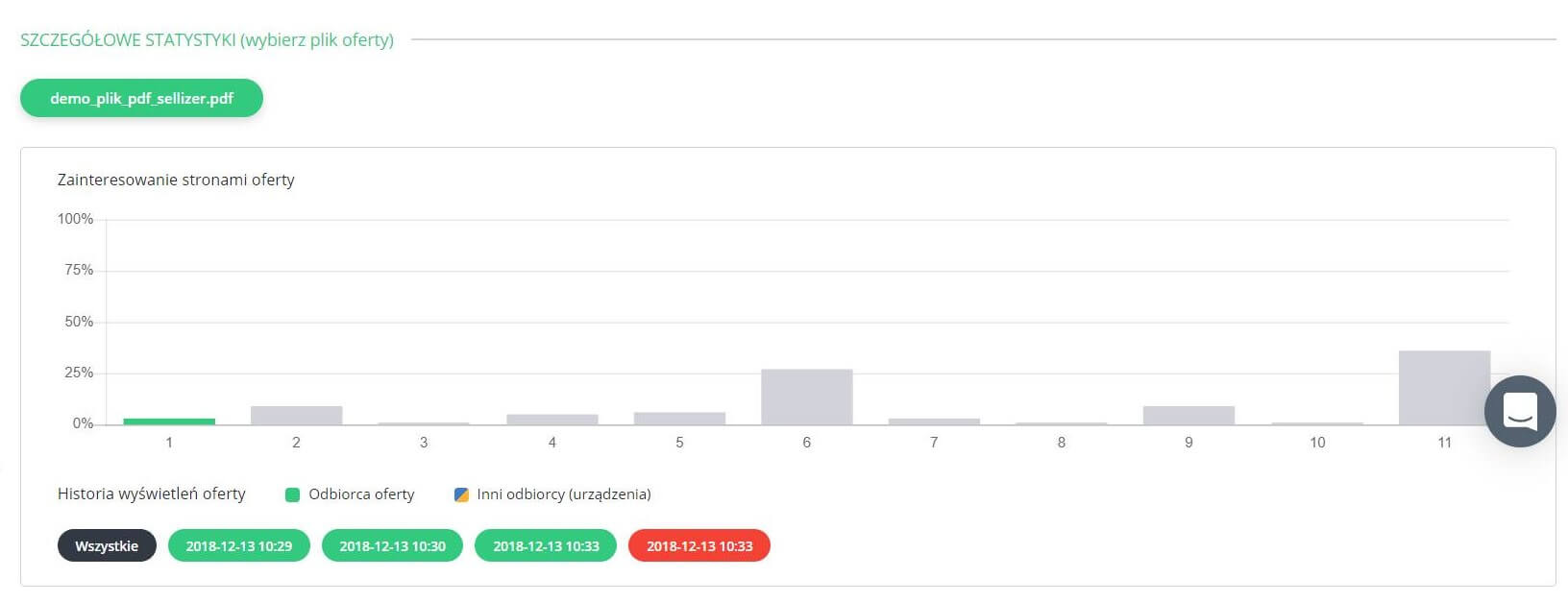
If your proposal consists of more than one file, you can conveniently check the statistics of each by selecting the name of the one you are interested in. If the client forwards your proposal (e.g. to their colleagues) or opens it again, subsequent openings will be recorded in the proposal's view history. Different button colors for the viewing dates indicate openings by other recipients.
Tip: use this knowledge to optimize your proposals. Check which pages your client focused on the longest and with the greatest attention, and which they skipped. Maybe they scrolled straight to the end, because that is where the information most relevant to them was placed? Such a tendency may suggest it is worth changing something in the proposal - reordering the slides, removing certain information or adding new content. Very often it turns out that less is more - we are all busy now, so we look for concrete solutions matched to our needs as closely as possible.
The same goes for the recipients of our proposals - they do not want to spend all their time browsing lengthy documents. Besides, what is important to us will not necessarily be important to the client. If you see that your clients usually skip certain pages of the proposal, it is worth considering removing them - after such an optimization, the average proposal viewing time of one of our users increased from 1.41 min to 3.12 min (even though the proposal was shortened from about 30 pages to 10!)
How to lead more effective sales conversations with Sellizer? Find out here!
Section 3: Preview and statistics of a specific page
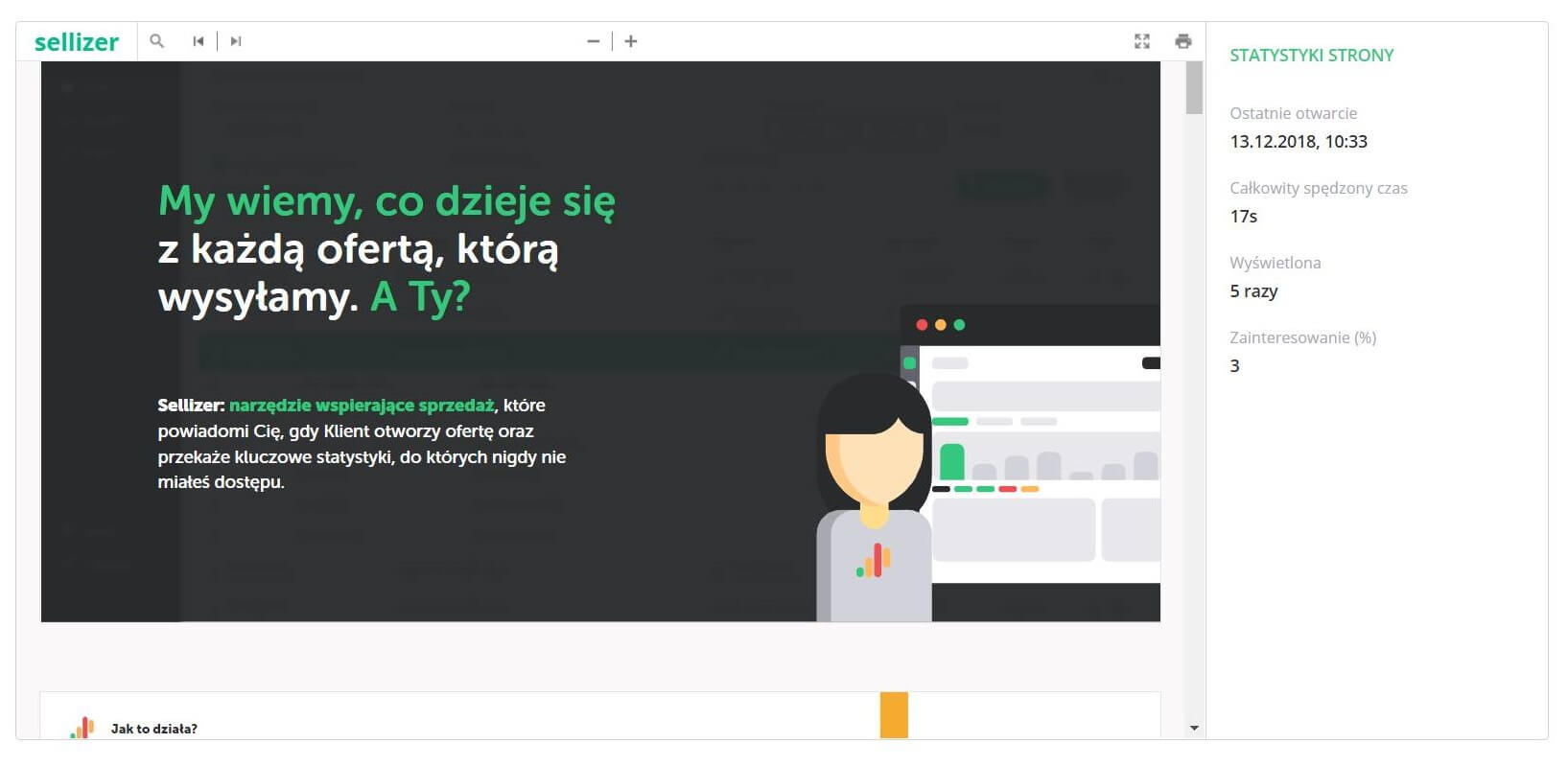
In this part of the statistics panel you will find a preview of your proposal. Scrolling through the slides, you can conveniently check the statistics of each page on the side bar. You can also open their previews by clicking the "bar" for the page you are interested in on the chart in section 2.
The benefits of analyzing proposal statistics
You know what is most important and most interesting to the client. You start the conversation with confidence, because you know what to talk about to catch their attention. You are also sure which direction to lead the conversation in so it is as valuable as possible for the client (focused on their needs while respecting their time).
You know which pages of the proposal the client paid no attention to at all. You do not open the conversation at random, following a generic script. You also reduce the risk of focusing first on something least relevant from the client's perspective and discouraging them from further conversation.
You know what the client did not view at all but, for their own benefit, should have. You can steer the rest of the conversation in that direction and present yourself as an expert advisor who cares about choosing the best solution for the client.
You will not miss the best time to contact the client - which is when they are viewing the proposal. You are sure they are focused on that exact activity and will surely take the chance to discuss the proposal on the spot - just as if it were a face-to-face meeting.
You know how to create and optimize proposals so they answer clients' needs as well as possible. By removing the pages they do not view or changing their order, you can make reading your proposal much easier while shortening their decision time.
You know your proposal was forwarded or printed. The openings of your proposal by new recipients, visible in the detailed data section, are valuable information for you. It means your proposal sparked interest and reached a wider audience.
FAQ
Which proposal statistic should I look at first?
Reading time per page. Total opens tell you the proposal got attention; the per-page breakdown tells you what to do with it - which topic to open the call with, which section to defend and which pages to delete from the next version. One chart answers all three.
What does it mean when a client opens the proposal several times?
Growing intent - repeat opens are one of the strongest buying signals, especially when new viewers appear (different button colors in the view history mean the file was forwarded). A proposal being reread on Thursday evening before a Friday decision meeting is a call you want to make first thing.
How soon after an opening should I call?
Within 2-5 minutes if business hours allow - the client still has your proposal on screen, so the conversation starts in context ("good timing, I was just reading it"). Outside working hours, wait for the next business day or for another opening rather than calling at 11 p.m.