



New Features in Sellizer #15 - “Priority” and “Engagement” Indicators

“Priority” and “Engagement” - Two New Columns That Will Change the Way You Manage Your Leads
If you’ve been using Sellizer for a while, you’re probably familiar with the SQI indicator. We’ve replaced it with something much better – two separate columns: PRIORITY and ENGAGEMENT. Each tells you something different, and together they give you a fuller picture of what’s happening with your proposals.
How Does PRIORITY Differ from ENGAGEMENT?
The old SQI indicator couldn’t answer two different questions at once: who to call right now and who was genuinely interested at some point.
The new columns solve that problem:
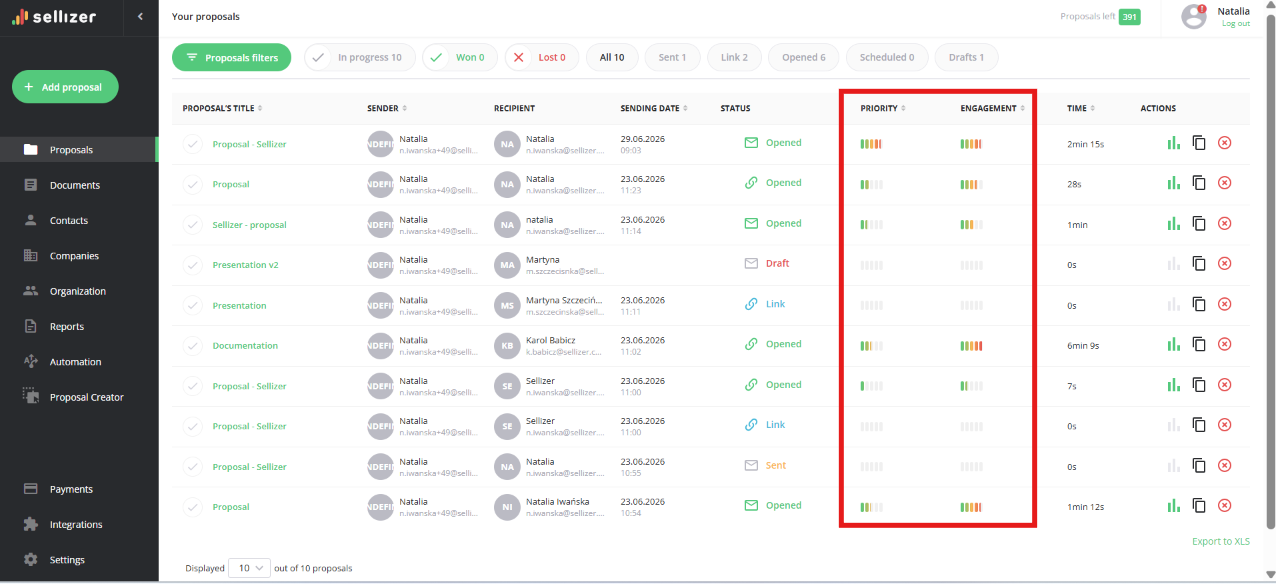
PRIORITY is a live signal. It’s calculated based on the recipient’s most recent activity. If the recipient stops opening the proposal over time – it drops. This way, the top of your list always shows who is active right now.
Engagement is memory. It remembers the recipient’s peak engagement and never drops – even if the recipient went quiet a month ago. This lets you see who was once genuinely hot and worth revisiting.
Both indicators run on a scale of 0–100. The more bars, the stronger the signal.
How Do You Read These Two Values Together?
The real power of these columns shows when you look at both at the same time:
PRIORITY | ENGAGEMENT | What it means | What to do |
|---|---|---|---|
High | High | Hot lead, active right now | Call or message as soon as possible |
Low | High | Was strongly interested, went quiet | Good time to follow up |
Low | Low | Cold, low activity | Low priority |
What Affects These Indicators?
What counts is the recipient’s real activity on the proposal. The strongest signals are:
clicking “request contact” or “request a contract”,
downloading or printing the proposal,
quick open right after sending.
time spent on the proposal – the longer and more pages scrolled, the stronger the signal,
opens from multiple devices (a sign that several people are viewing it at once – e.g. a decision committee),
returning to the proposal after a longer silence,
quick open right after sending,
A few opens is a good signal, but a very high number isn’t necessarily – sometimes a recipient “circles” the proposal because they can’t make up their mind.
A weaker signal is simply opening the email – because these are often mail bots, not a real person.
Where Do You Find These Columns?
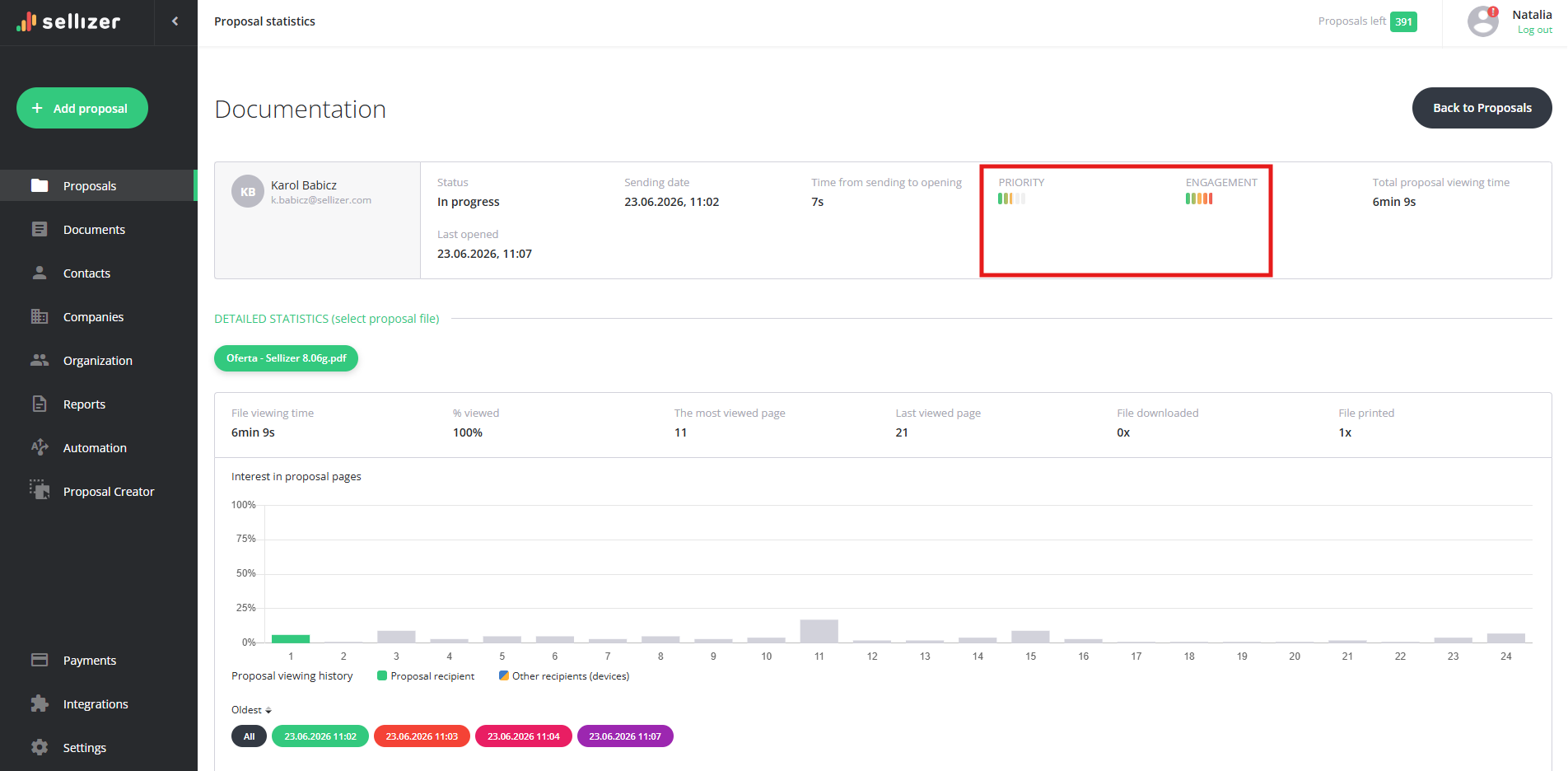
PRIORITY and ENGAGEMENT are visible in several places in Sellizer:
proposal list (main dashboard),
recipient list under a specific proposal (when expanding a proposal with multiple recipients),
proposals in company or contact detail pages,
statistics for a specific proposal.
On mobile and narrow screens, both values can be found in the row detail view.

Important: This Is a Hint, Not a Guarantee
A high PRIORITY or ENGAGEMENT is a signal to act – not a promise of a sale. The tool tells you this recipient is interested right now or this one was once hot. The decision of when and how to reach out is always YOURS.
Frequently Asked Questions
Why is PRIORITY low but ENGAGEMENT high?
This is one of the most valuable signals in the entire system. It tells you: this recipient was once genuinely interested, but has gone quiet recently. It’s the perfect moment to reach out.
Why Does PRIORITY Drop but ENGAGEMENT Doesn’t?
PRIORITY shows that the recipient was recently active on the proposal. If the recipient stops opening it, it decreases a little each night – roughly by half after a week of silence. This keeps your list always showing the current state, not what was happening last week. When the recipient opens the proposal again, PRIORITY immediately goes back up.
ENGAGEMENT works differently - it remembers the highest level of engagement and stays at that level. This is intentional. We want you to always know who was once close to a decision – even if several weeks have passed since then.