



New Features in Sellizer #16 - Webhooks: Automatic Notifications for Proposal Events

What is a webhook, anyway?
Before we get to the news - a quick explanation for those who haven't worked with webhooks before.
A webhook is an automatic notification between apps. Instead of constantly checking Sellizer and asking "has the client opened the proposal yet?", Sellizer sends you a signal: "hey, they just did it". Not to your phone, but to another tool - for example, your CRM or an automation tool like Zapier or Make.
Think of it like a push notification - except it goes between apps, not to a person.
What does this change in practice?
Until now, to know that a client opened or downloaded a proposal, you had to check manually or wait for an email notification. Now you can go a step further:
Client opens a proposal → a task for the sales rep automatically appears in your CRM.
Client downloads a file → Zapier (or another automation tool) triggers a follow-up sequence.
Proposal is marked as won → your system (e.g. Make, Zapier, CRM) automatically kicks off the next processes.
The faster you react to a client's engagement, the better your chances of closing the deal. Webhooks bring that reaction time to zero.
What can Sellizer notify you about?
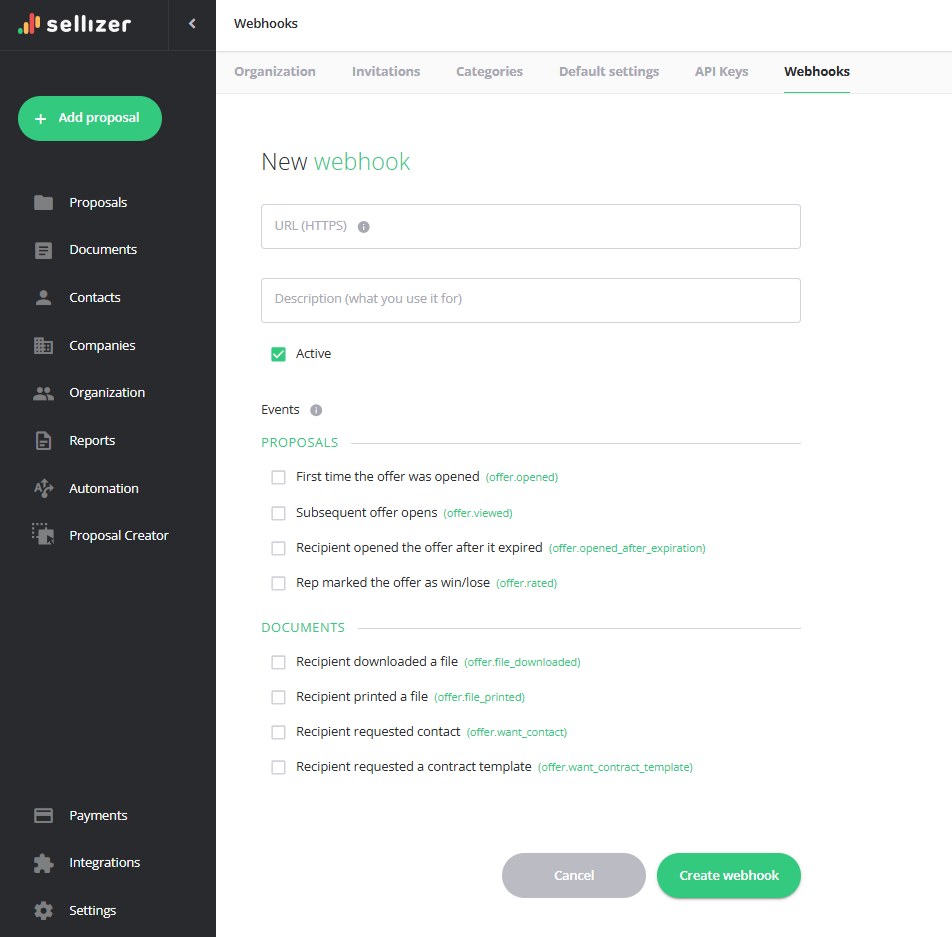
In the first version of webhooks, we've launched eight events:
First proposal open
Subsequent offer open
Recipient opened the proposal after it expired
File downloaded
File printed
Contact request - the client indicated they want you to reach out.
Contract template request - the client asking for a contract template
Proposal rated - the sales rep marked the offer as won or lost.
How to create a webhook in Sellizer?
Note: Webhooks in Sellizer are available on the Team plan.
The entire setup happens in the panel, in just a few clicks:
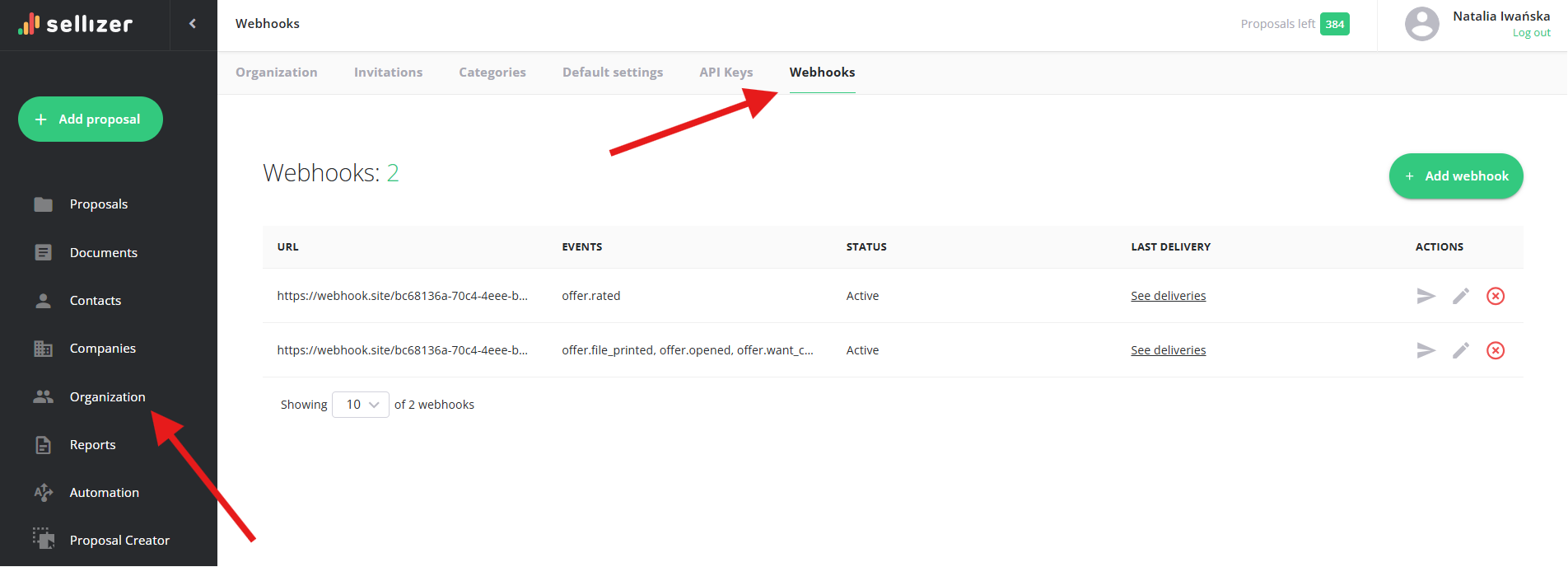
Go to Organization → Webhooks tab and click "Add webhook".
Paste the URL (you get it from Zapier, Make, another automation tool, or your IT team).
Select which events you want to be notified about.
Save and copy the secret (used to verify that the notification really comes from Sellizer).
Optionally: click "Send test event" to confirm everything works.
If you want to connect this to your own system or a more advanced integration, you may need IT help on your side. But setting up webhooks in Sellizer itself takes just a few minutes.
Security and reliability
We know integrations need to be trustworthy. Here's what we've taken care of:
Signed notifications. Every webhook is signed with a secret - your system can verify it genuinely comes from Sellizer (industry standard: Standard Webhooks, HMAC-SHA256).
Automatic retries. If your system temporarily doesn't respond, Sellizer will try again.
Delivery log. In the Sellizer panel you can see the full history of all deliveries – when, what, and with what result. Makes troubleshooting easy.
Automatic disabling. If the address becomes permanently unavailable, Sellizer will disable the webhook and notify you by email.
FAQ - frequently asked questions about webhooks in Sellizer
Do I need a developer to set up webhooks in Sellizer?
For the configuration in Sellizer itself - no. You usually get the receiving URL ready-made from a tool like Zapier or Make. More advanced integrations with your own system may require IT help on your side.
What tools do webhooks in Sellizer work with?
Any tool that can receive an HTTP notification – including Zapier, Make, n8n, and custom applications or CRMs.
Are webhooks in Sellizer secure?
Yes. Every notification is signed with a secret, so the recipient can confirm it comes from Sellizer. The address must be accessible via HTTPS.
What happens if my system temporarily doesn't respond to a webhook in Sellizer?
Sellizer will retry the delivery. If the address becomes permanently unavailable, the webhook will be automatically disabled and you'll receive an email notification.
I lost my webhook secret in Sellizer - what now?
Use the "Change secret" option in the webhook settings in your Sellizer panel. You'll receive a new secret; keep in mind the old one will stop working, so update it on your end.
Where can I check if webhooks in Sellizer are working correctly?
In the panel, under "View deliveries" for a given webhook - there you'll find the delivery history with status and content preview.